Display recent posts
Re: Eliminating unnecessary Name:
yonda Date: 2026/07/01(Wed) 20:24:52
 No.503
> Eliminating unnecessary worries about payout safety becomes real when you stick to well-known brand names. For a transparent view of the best digital roulette tables and traditional slot options in Australia, it is wise to open [melbet paiement retardé](https://supertutobet.com/faire-un-retrait-sur-melbet/). This website translates heavy regulatory data into simple sentences, allowing any ordinary beginner to understand wagering requirements and play safely.
Eliminating unnecessary Name:
yonda Date: 2026/07/01(Wed) 20:24:24
No.502
Eliminating unnecessary worries about payout safety becomes real when you stick to well-known brand names. For a transparent view of the best digital roulette tables and traditional slot options in Australia, it is wise to open [url=
https://crown-melbourne-online.com]Crown Melbourne Online[/url]. This website translates heavy regulatory data into simple sentences, allowing any ordinary beginner to understand wagering requirements and play safely.
Re^2: Error 6.0.3 Name:
Chris Date: 2021/07/27(Tue) 22:14:56
No.37
6.0.5 has fixed the issue. Thank You!
Re^3: Copy Error 6.0.4 Name:
Masayuki Fukush Date: 2021/07/02(Fri) 11:26:18
No.31
> It was OK in version 5. But when we upgraded to v6, this NG scenario occurred.
I see.. In version 6, the resolution of copied image became higher, so maximum image size became lower.
Now I'm reviewing the source code to fix this problem.
>
> Also, we want it as embedded DynamicDraw object (instead of just a plain emf/jpg/png) since the Word/Excel is used for collaboration.
>
>
> > Oh sorry, the error message is something strange. :-(
> > Dynamic Draw cannot copy large image. But it will be possible to export as a image file.
> > Try the following menu command to export an image file.
> >
> > File menu > Export selected object picture
> >
> > Then start Word/Excel and import the image file.
> >
> >
> >
> > > Hi! When I copy the drawing, an error message occurs: "A part of image was not copied because the area was too large. It is some problem if you past as metafile."
> > >
> > > Then when I paste in Word/Excel as embedded object, the pasted image is incomplete.
> > >
> > > Is there as fix/workaround for this?
Re^2: Copy Error 6.0.4 Name:
Aerith Date: 2021/07/01(Thu) 16:56:17
No.30
It was OK in version 5. But when we upgraded to v6, this NG scenario occurred.
Also, we want it as embedded DynamicDraw object (instead of just a plain emf/jpg/png) since the Word/Excel is used for collaboration.
> Oh sorry, the error message is something strange. :-(
> Dynamic Draw cannot copy large image. But it will be possible to export as a image file.
> Try the following menu command to export an image file.
>
> File menu > Export selected object picture
>
> Then start Word/Excel and import the image file.
>
>
>
> > Hi! When I copy the drawing, an error message occurs: "A part of image was not copied because the area was too large. It is some problem if you past as metafile."
> >
> > Then when I paste in Word/Excel as embedded object, the pasted image is incomplete.
> >
> > Is there as fix/workaround for this?
Re: Copy Error 6.0.4 Name:
Masayuki Fukush Date: 2021/07/01(Thu) 16:40:44
No.29
Oh sorry, the error message is something strange. :-(
Dynamic Draw cannot copy large image. But it will be possible to export as a image file.
Try the following menu command to export an image file.
File menu > Export selected object picture
Then start Word/Excel and import the image file.
> Hi! When I copy the drawing, an error message occurs: "A part of image was not copied because the area was too large. It is some problem if you past as metafile."
>
> Then when I paste in Word/Excel as embedded object, the pasted image is incomplete.
>
> Is there as fix/workaround for this?
Copy Error 6.0.4 Name:
Aerith Date: 2021/07/01(Thu) 15:20:18
No.28
Hi! When I copy the drawing, an error message occurs: "A part of image was not copied because the area was too large. It is some problem if you past as metafile."
Then when I paste in Word/Excel as embedded object, the pasted image is incomplete.
Is there as fix/workaround for this?
Re^2: Error 6.0.3 Name:
Chris Date: 2021/06/26(Sat) 05:10:03
No.27
Thank you! I will test and report back when new release is ready.
Re: Error 6.0.3 Name:
Masayuki Fukush Date: 2021/06/25(Fri) 22:28:22
No.26
Thanks Chris,
Your detail information helped me to find the cause of the bug.
I guess it will be happened when you open two or more documents under a single project.
The bug will get fixed in the next release.
> Hi Masayuki.
>
> I sometimes get an error 'c:/src/thoughttickler/dynamicdraw/hiproject.cpp(262)' when editing text or resizing objects. Is there any other information I can provide to help?
>
> Thank You
> Chris
Error 6.0.3 Name:
Chris Date: 2021/06/25(Fri) 02:11:12
No.25
Hi Masayuki.
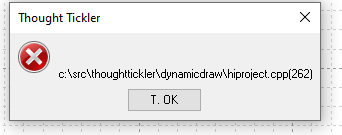
I sometimes get an error 'c:/src/thoughttickler/dynamicdraw/hiproject.cpp(262)' when editing text or resizing objects. Is there any other information I can provide to help?
Thank You
Chris
- WebForum -